

Data scrubber offers exceptional versatility by seamlessly accommodating a wide range of data formats, including Excel, and CSV. This adaptability is a cornerstone of our design philosophy, enabling users to work with their data in the formats that suit their specific needs. Whether you're dealing with structured spreadsheets, or tabular CSV data, our module effortlessly processes and analyzes them all. This flexibility not only simplifies data integration but also empowers users to harness the full potential of their data without the constraints of format limitations. With our module, you can confidently handle diverse data sources, ensuring that your analytical or processing tasks remain efficient and hassle-free, regardless of the data format you encounter.
We are going to be using famous diamond prices dataset through this documentation, we already have it as part of the datasets so we can just follow through
xxxxxxxxxxdata_cleaner.read_data("./Datasets/DiamondPricesData.xlsx")The module automatically returns a description of the data being entered and for cases of files with multiple sheets, it grants permission to chose one and then provides a description of the data plus the first five rows.
The description is in the format
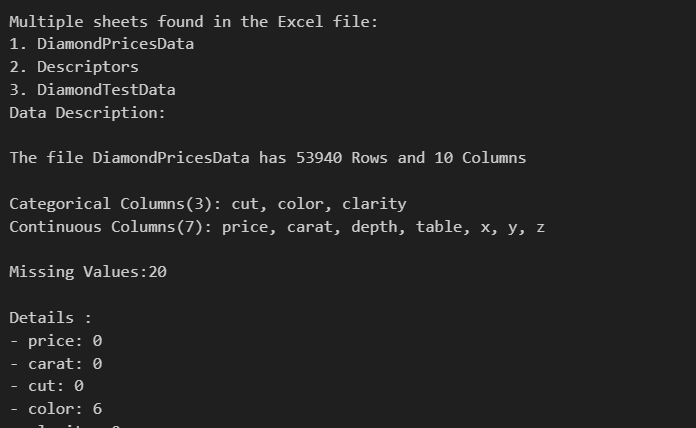
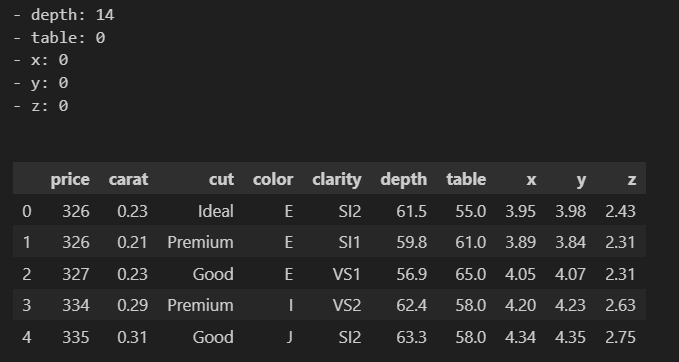
At this stage, the data scientist or analyst is responsible for the rest of the decisions. If the the analyst wants the missing values and outlier handling processes to be handled automatically and getting back clean data, this is practically applicable in machine learning and Artificial intelligence, then they to use;
xxxxxxxxxxdata = data_cleaner.data_cleaning()data.head() ## continue using data in the notebook or any python fileBut if you want to get a cleaned dataset then we must save it.
xxxxxxxxxxdata_cleaner.data_cleaning()data_cleaner.savedata() ##downloads data file.But if we are interested in exploring all the steps of the Exploratory Data Analysis EDA then we shall have to go through a number of steps which also do not require hard coding. So we can try navigating through some
Understanding the entered data.
We may want to check out the columns that we are having in our dataset which we can achieve by
xxxxxxxxxxdata_cleaner.columns()OR
xxxxxxxxxxcolumns_list = data_cleaner.columns()print("Columns:", columns_list)And the result is given as

Looking at the a number of rows.
We may need to look at a number of rows in our data that is to say the first 5, 10, 20 etc. we can use the head function which takes in the number of rows you may want to print of which can be an integer or a floating point.
xxxxxxxxxxdata_cleaner.head(8)OR
xxxxxxxxxxdata_cleaner.head(8.9)Renaming the columns
In some datasets, the feature names may be quite lengthy. If you find that the naming is challenging and it hinders your understanding of the data, consider renaming the columns for better clarity.
In the code below, I have columns with '/' characters, which I replaced with '_' using the rename function.
data_cleaner.rename(["SALT/ ACID","BITTER/ SWEET","MOUTH FEEL","CLEAN CUPS","OVERALL SCORE"], ["SALT_ACID","BITTER_SWEET","MOUTH_FEEL","CLEAN_CUPS","OVERALL_SCORE"])